



.JPG)

Cant find the role you’re looking for?
Sign up to be the first to know about future job openings at GetYourGuide
Stay notified of new jobsCopyrighted 2008 – 2023 GetYourGuide. Made in Zurich & Berlin.

At GetYourGuide, data-driven decisions are core to our culture. So what happens when we have to scale up A/B testing without bogging down the entire data department? Data Analyst, Dima Vecheruk and Senior Data Engineer, Eugene Klyuchnikov walk us through how they got their team running tests in self-service mode.
{{Divider}}
On the product development side, our major contribution is providing tools and analysis around A/B testing, commonly referred to as split testing. The Data Analytics and Data Platform teams have a common goal of enabling all teams to make data-driven decisions. It’s a core part of our company culture.
During a recent data team presentation, a colleague summed it up nicely, “It wouldn’t be a GetYourGuide presentation if I didn’t tell you how we’re going to measure impact.”
{{Divider}}
To recap, an A/B test is a controlled experiment where a population of website users is randomly split into two test groups, a control and a treatment group. We expose the treatment group to a new version of the same web page with some element of the experience changed.
If we measure conversion rate or another success metric between the two groups and see a noticeable difference, we can claim that this difference is due to the change we introduced.
A classic frequentist A/B test follows a strict methodology that consists of three parts:
{{Divider}}
From a practical perspective, we needed to enhance this flow with additional steps:
{{Divider}}
In the past, teams at GetYourGuide used custom solutions, as the speed of development of our A/B testing tools was not stable between our web and app platforms. As a result, they often had to speak to a data analyst to help with planning tests or digging deeper into the effects.
Analysts had to write custom code to measure experiments affecting metrics beyond conversion rate, which became increasingly common as product teams became more specialized.
As our engineering and product teams grew steadily and their capacity to ship experiments increased, providing timely support by writing custom queries and even reusable notebooks were no longer enough.
It was also tricky to onboard and train people in A/B testing, as there were too many exceptions between product teams. While we already had a working experiment dashboard built in Looker, not all teams could use it. Not to mention it only worked fully for a subset of standardized experiments.
{{Divider}}
To avoid becoming a bottleneck, data analysts and engineers kicked off a project to streamline the process as much as possible. We tried to make the steps outlined above available to teams in self-service mode.
As a result, we created an updated architecture. The new model supports experiments from all product teams and provides fast reporting. We use Looker, a business intelligence tool for data monitoring and exploration. We also built a set of tools, mostly Looker dashboards, that cover the needs around planning, monitoring, and analyzing tests.
Senior Data Engineer, Zoran Stipanicev shares another Looker use case here.
Here are some new things we’ve introduced:
The new and improved data architecture
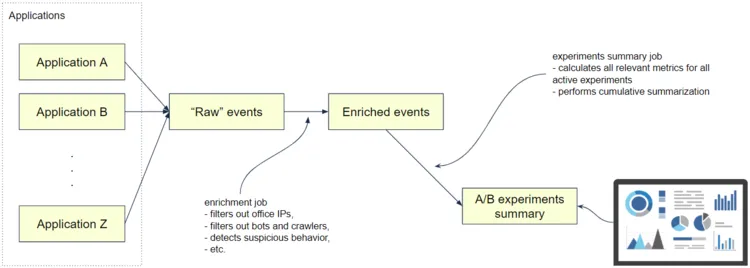
On a high level, the data architecture for the experimentation platform consists of two major parts:
The final summarization job calculates the performance metrics for all active tests daily, and visualization and analysis are usually built on top of it. The summary contains only factual information.
Actual performance metrics or statistical tests are moved out to a visualization platform. For example, the summary would contain the number of visitors and purchases but not a conversion rate, because it can be easily calculated from the previous two.
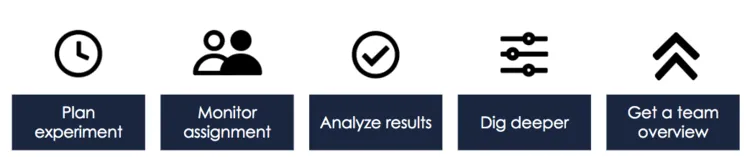
From product managers who generate the ideas and orchestrate the teamwork, to analysts planning tests, to developers who deploy to production, success in testing is a team effort. All these steps require a different data set, and we do our best to provide the right tools for them.
We built a Looker dashboard that allows any team to get the baseline of a metric they are trying to optimize. It enables them to estimate how long an experiment will run given certain levels of uplift expected.
We can limit the calculation to particular segments of traffic or specific products. It then shows what effect this would have on the duration of the test as the daily sample size is reduced.
We use Kibana, an open-source analytics and visualization platform, for real-time event monitoring so that developers can quickly monitor and debug experiment assignments even before our framework completes the daily aggregation job.

This step is covered by our main experiment dashboard that picks up aggregated statistics from the summary table and presents them along with the results of statistical tests and data quality checks.
We introduced new concepts of success and support metrics in our framework. A success metric is the business-relevant target of an A/B test, e.g. conversion rate. A support metric, on the other hand, is a measure of the immediate impact of the treatment, e.g. product page click-through-rate for experiments on product pages.
The success of the test is measured by changes in the success metric only, whereas the support metric serves as an additional explanation to validate whether or not the treatment is working as expected. These metrics are configurable, and therefore our dashboard is very flexible in supporting tests on different parts of our product.
Sometimes it’s not enough to look at the success and support metric. To dig deeper into results, we built an additional tool that enables teams to configure a downstream funnel starting from the screen their treatment is on.
It could also turn out that a product experiment pushes users to the next step of the conversion funnel, but then they drop off, which leads to an overall inconclusive result. This is important learning that can now be achieved in self-service mode.
{{Divider}}
At GetYourGuide, product experiments don’t exist as individual random attempts but are aimed at solving a particular user problem. Besides, a team working on the product page may have multiple desktop, mobile and app experiments in flight at the same time and need to get a quick overview without delving into the details of each individual test.
With this in mind, we built a flexible overview dashboard that provides at a glance data on experiment performance for daily team updates. They can quickly see which experiment already has reached sufficient sample size, and which experiment unexpectedly breaks guardrail metrics and should be looked at in detail.
{{Divider}}
Our efforts of simplifying the process are beginning to bear fruit, as we can support significantly more tests with the same number of data analysts and engineers. Here are the benefits we have identified:
If you are interested in product analytics, A/B testing, and data engineering, check our open positions in engineering.
If you’re interested in a data science role, have a look at our article on preparing for a data science interview.


